Qustodio Review (2026): Is It Worth It Over Free Controls?
This Qustodio review comes from setting it up ourselves, on a parent phone and a child phone for a made-up 11-year-old called Emma. Our verdict: for one Android phone or one iPhone, free Family Link or Screen Time does the job. Qustodio is worth paying for if your child also uses a Windows PC or Mac, or your family mixes iPhone and Android. The parent side is easy. The child phone is harder: five permissions and a security certificate.
Below: each screen, the US price (about $60 or $105 a year), what kids get around, and when the free tools already on your child's phone, Google Family Link and iPhone Screen Time, do the same job.
The short answer
- Worth paying for if your child has a Windows PC or Mac, or a mix of iPhone and Android, and you want one dashboard for all of it.
- Probably not worth it for one Android phone or one iPhone. Family Link and Screen Time are free and cover daily limits, bedtime, app approval and content filters. Going free? Pair them with a "Screens off by 8 pm" habit in Family Checklist (free for 3 family members with 3 tasks each).
- Per-app time limits are free in Family Link and in iPhone Screen Time (Time Allowances). In Qustodio they need the Complete plan, as does YouTube monitoring.
- Plan for about 10 minutes per device (Qustodio's own estimate), more if the certificate step trips you up, and a conversation with your child first. A 10–13-year-old who wants out can often find a way.
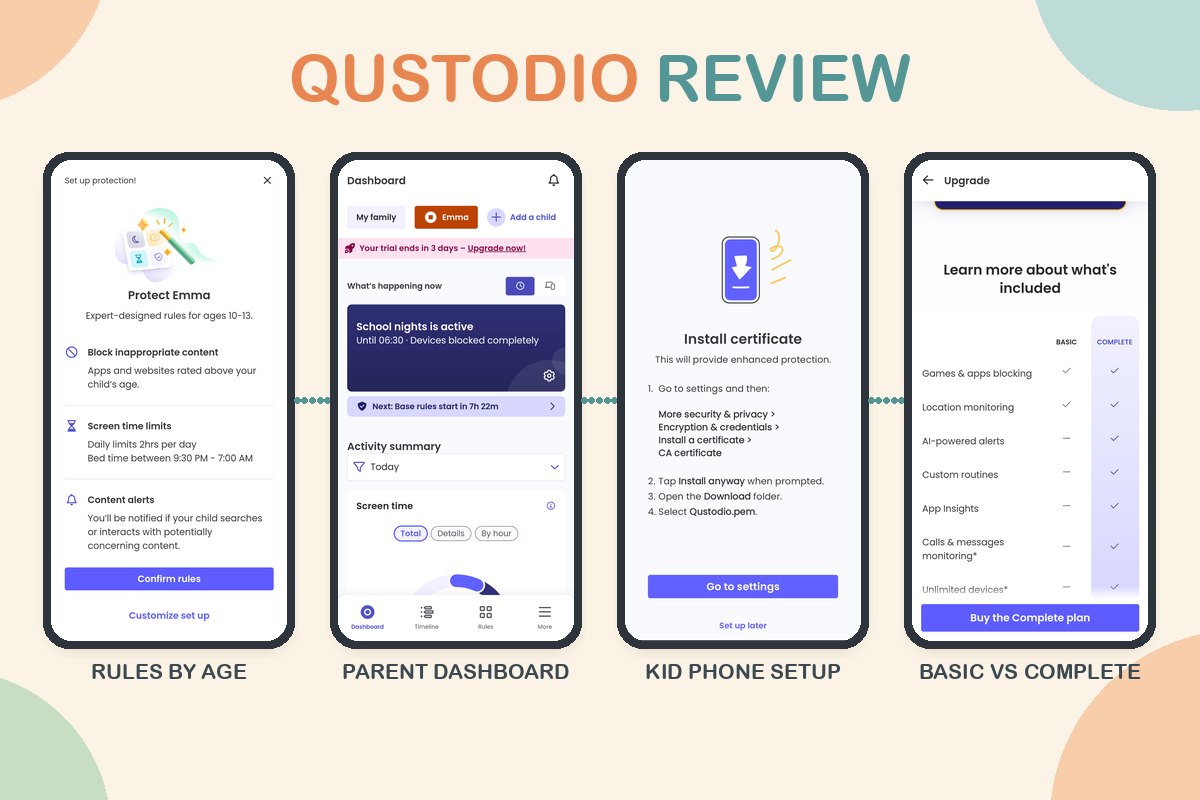
How We Did This Qustodio Review
On November 3, 2026 we installed both Qustodio apps from Google Play on two Android 14 test phones (emulators, not real handsets). One acted as the parent's phone, with the parent app version 182.41.0. The other was the child's, with the Qustodio Kids app. We signed up with a test email, added a child profile for "Emma," and linked her phone. We did not pay for anything. We make Family Checklist, a habit app, not a parental-control tool. We have no relationship with Qustodio and earn nothing from it or from any app named here.
Sign-up started a Premium trial with no card. The dashboard banner said "Your trial ends in 3 days." Prices below come from Qustodio's US pricing page and the US app stores, checked the same day.
| What we checked | What we saw | The catch |
|---|---|---|
| Parent setup | Ready rules for ages 10–13 in one tap | Social networks and chat stay allowed by default |
| Child phone setup | Five permissions, then a security certificate | Each one is a step a child can later undo |
| Daily limit and bedtime | Per-day limits; routines block the device at night | Per-app time limits are Complete only |
| Price (US) | $59.95 Basic, $104.95 Complete per year on qustodio.com | App store prices differ; the trial lasted 3 days |
| iPhone | Works, through a VPN and a profile | Fewer features than Android; some need a computer |
Parent Setup: Ready Rules for Ages 10–13
The parent side is the best part of Qustodio. After we added Emma, the app offered "Expert-designed rules for ages 10-13." The preset blocks apps and websites rated above the child's age. It sets a daily limit of 2 hours and a bedtime from 9:30 PM to 7:00 AM. It also turns on alerts when the child "searches or interacts with potentially concerning content." One tap on Confirm rules, and they were on.
The dashboard then showed what was in force right now. That evening it read "School nights is active · Until 06:30 · Devices blocked completely," with the time until the daytime rules started again. School nights is a separate routine with its own 06:30 end, not the 7:00 AM bedtime from the preset, so check every routine after setup. A daily total sat underneath. The first thing it logged was the setup itself: 2 minutes in Android's Permission controller and 1 minute in Settings.
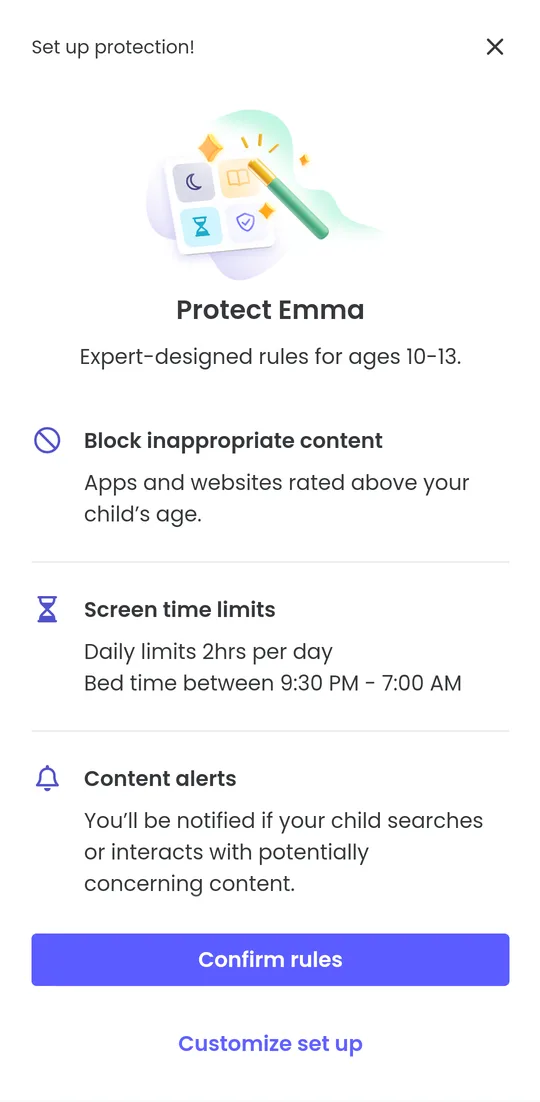
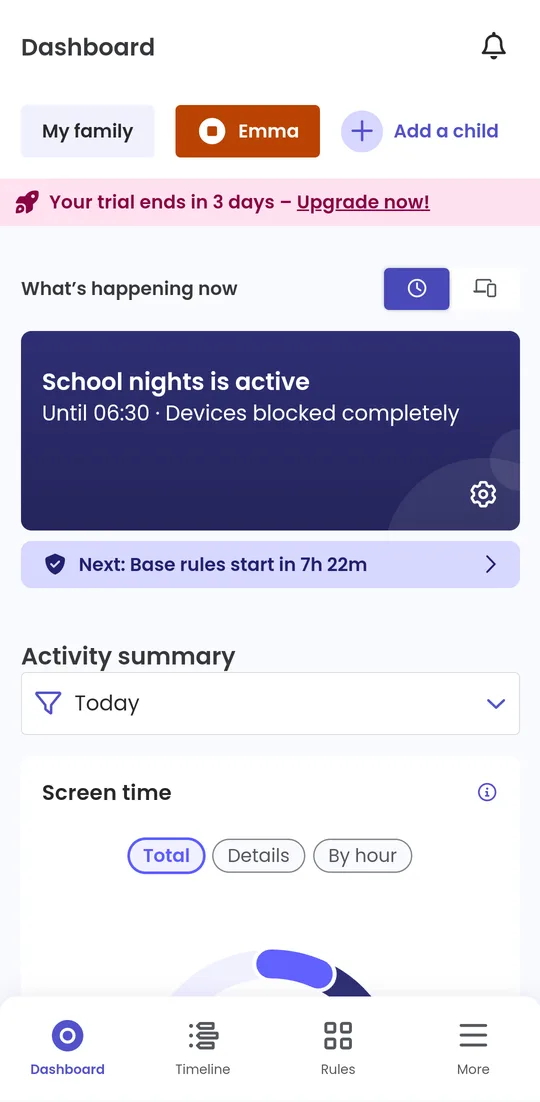
Our test account, November 2026.
One thing to change straight away: the preset is not strict about social media. In Emma's web filter, Social networks, Chat, Forums, Games and Webmail were all set to Allowed (the web-filtering screenshot in the next section shows the end of the list). Gambling, Violence, Weapons, Pornography, Mature content, Drugs, Alcohol, Tobacco, Profanity and Proxies/Loopholes were set to Blocked. If your 11-year-old isn't on social media yet, set those categories to Blocked yourself. Our social media age limits guide shows the minimum age for each app.
Setup on the Kid's Phone: Where Most Complaints Start
The child phone takes longer. Qustodio's own Android install guide says to remove Google Family Link first. You then switch on Accessibility, notifications and location, activate it as a device admin app, allow a VPN, install a certificate, and turn off battery saving. Qustodio says this "takes about ten minutes" per device. On our test phone, the app also asked for usage access before the rest.
The certificate step is the one parents trip on. The kid app filled the screen with a four-step path through Settings: More security & privacy, Encryption & credentials, Install a certificate, CA certificate. Then you tap Install anyway and pick a file called Qustodio.pem. Later the same day, the child phone showed a full-screen "Permission missing!" message asking us to allow permission again.
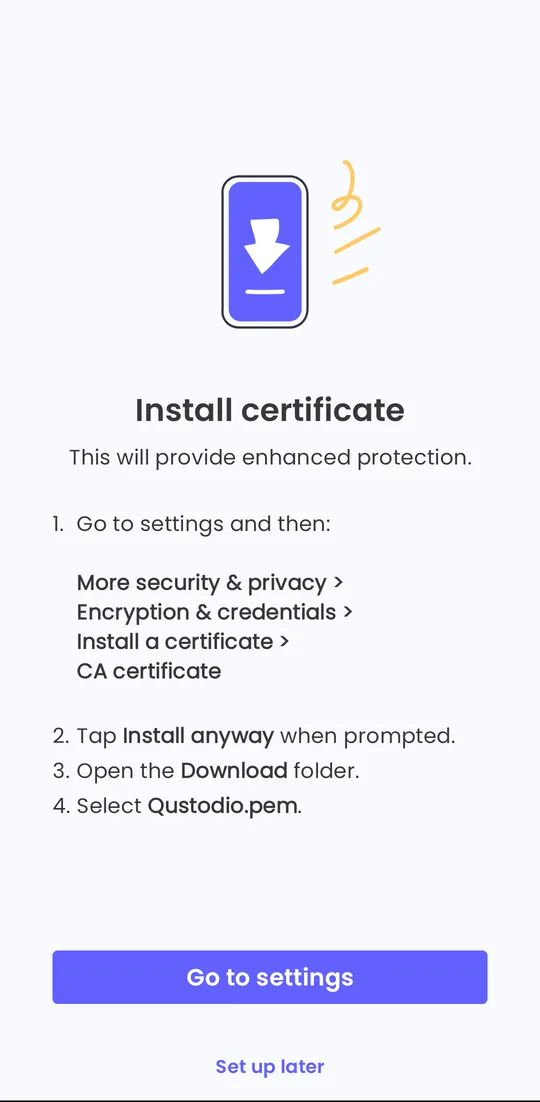
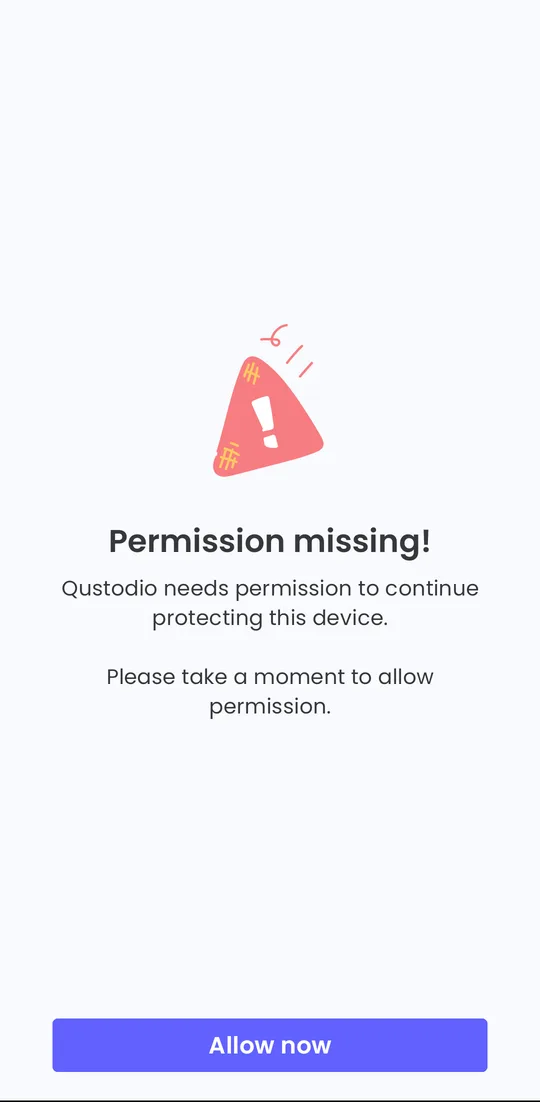
Our test account, November 2026.
Store reviewers describe the same thing. A Google Play review of the parent app from September 2026: "You need to be an experienced cellphone/IT professional to set this up where it actually works." In our sample of store reviews, setup was one of the three most common complaints, after billing and bugs.
It helps to know what those permissions do. Qustodio's iPhone FAQ says its VPN "sends your child's network traffic through Qustodio servers where monitoring and rules can be enforced." On Android the setup asks for a VPN and a certificate as well. Some reviews, many written by kids, call that invasive. Several reviews also complain about battery drain on the child's phone; we didn't measure battery in our short test.
Qustodio explains that if Accessibility is turned off on Android, "all monitoring will be disabled," the device gets "unrestricted access to the internet," and nothing protects Qustodio from being uninstalled. So after setup, open the parent app and turn on "Protect Android Settings" for the device. That is Qustodio's own advice for making a bypass harder.
What Qustodio Blocks, and What Happens When Time Runs Out
Two screens do most of the work. Web filtering lists 30 content categories, each set to Allowed or Blocked, with a Websites tab for exceptions. Daily time limits set a separate allowance for each day of the week, so Saturdays can be longer than Tuesdays.
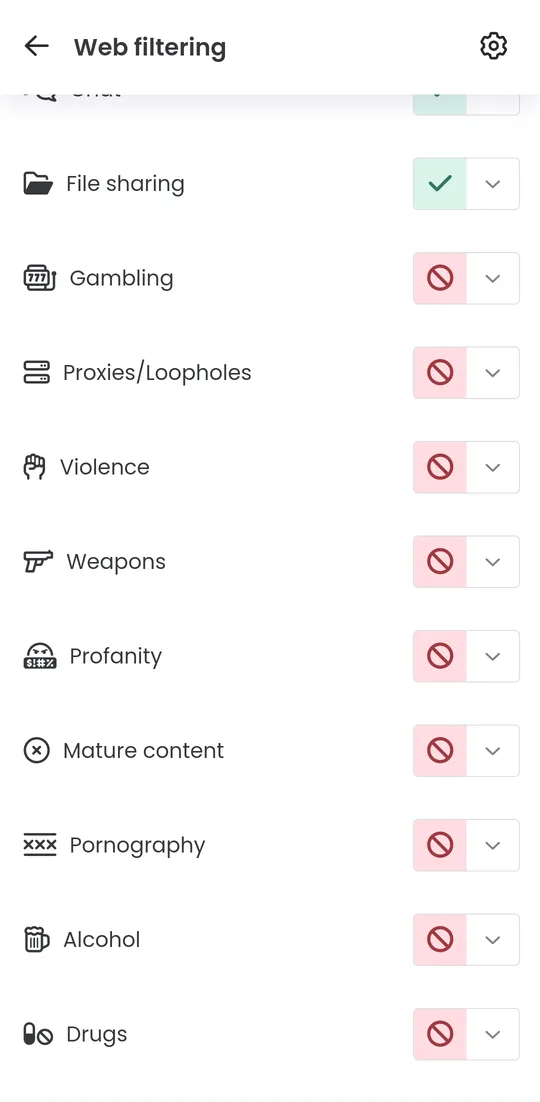
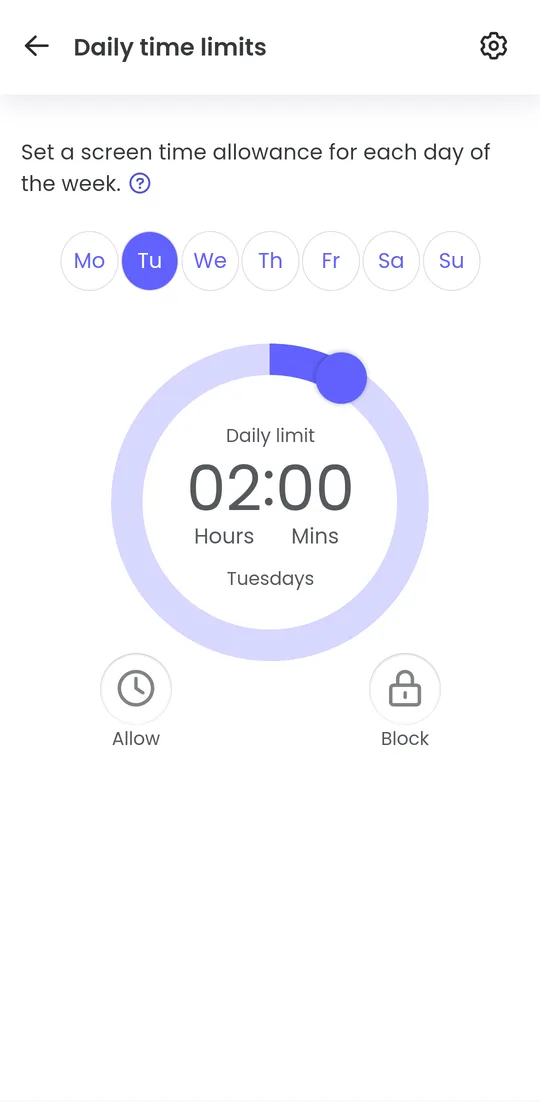
Our test account, November 2026.
The setting that decides how strict this feels is hidden behind the gear icon: "When time's up." You get three choices. Lock navigation blocks web browsing and internet access. Lock device blocks apps on Android and hides them on iOS. Alert me only notifies you. With Lock navigation, apps that don't need the internet can keep working. One parent's Play review described exactly that: "it still lets her text when her phone time is supposed to be off, it just turns off her browser."
The daily limit counts the whole device. To give one app 30 minutes and leave homework apps unlimited, you need "Games & apps time limits," which is a Complete-plan feature on Qustodio's pricing page. So is YouTube monitoring.
What Kids Get Around, and What the 1.4-Star Rating Means
On November 3, 2026, the ratings in the US stores looked like this:
| App | Google Play | App Store |
|---|---|---|
| Parent app | 3.6★, 24.6K reviews, 10M+ downloads | 4.2, 9.6K ratings |
| Kids app | 1.4★, 56.9K reviews, 1M+ downloads | 2.2, 7.9K ratings |
Don't read the kids app's 1.4 stars as parents' verdict. Many of those reviews are written by children. In the 500 most recent App Store reviews of the kids app, 126 mention "my parents," "my mom" or "my dad." Only 36 mention "my son," "my daughter," "my kid" or "my child." Researchers have seen this before. A CHI 2018 study by Ghosh and colleagues read 736 children's reviews of 37 online-safety apps. It found "76% of the child reviews giving apps a single star." Children felt the apps were too restrictive, invasive, and bad for their relationship with their parents.
The parent reviews are the useful ones. We read about 640 one- and two-star parent reviews from both stores. The complaints that came up most, in order:
- Billing and refunds: auto-renewal and refused refunds came up most often in those reviews.
- It stops working: "often just stops reporting, needs constant monitoring of what's going on" (Google Play, August 2026).
- Hard setup, as above.
- Slow support and, on iPhone, features that need a computer.
- Kids get around it: "My kid bypassed it in 17 minutes. This creates another conflict" (App Store, September 2026). Another parent: "My son figured out all he had to do was delete it."
None of this is unique to Qustodio. Common Sense Media puts it plainly: "Yes, kids can undo parental controls," and the instructions are easy to find online. Common Sense recommends using controls "openly and honestly in partnership with your kids." Qustodio does send a "Tampering detected" alert when protection is interfered with. That gives you a moment to talk about it, not a lock nobody can break.
Qustodio on iPhone vs. Android
Qustodio works on both, but not equally. Its own Android vs. iPhone comparison and help pages list these differences:
| Feature | Android | iPhone / iPad |
|---|---|---|
| App monitoring | Yes | Only supported apps |
| How app blocking works | Blocks the app | Cuts the app's internet connection; downloaded content still shows |
| Panic button | Yes, off by default | No |
| Calls and messages | Not in the Google Play version; needs a separate download from Qustodio | Needs a Mac or Windows computer |
| Stop the child removing it | "Protect Android Settings" in the parent app | Qustodio Advance on a computer, with a cable; not compatible with iOS 27 |
Qustodio also says some iPhone apps, "such as WhatsApp, Brawl Stars or Clash Royale," use connections it "can't" block or accurately report (Qustodio Help). For an iPhone-only family, the built-in Screen Time controls the device more directly.
Qustodio Price: Free, Basic and Complete
Qustodio has a Free plan and two paid plans. The prices below are from qustodio.com as seen from the US on November 3, 2026. The site shows prices in the visitor's currency, and the in-app paywall in our screenshots showed euros because our test account's store country is in Europe.
| Plan | US price (qustodio.com) | Devices | What it adds |
|---|---|---|---|
| Free | $0 | 1 | "Basic protection features" |
| Basic | $59.95 a year ($5.00/month) | Up to 5 | Web filtering, app blocking, daily limits, device blocking routines, location, 30-day reports |
| Complete | $104.95 a year ($8.75/month) | Unlimited (family) | Per-app time limits, YouTube monitoring, calls and messages, AI alerts, app insights, priority support |
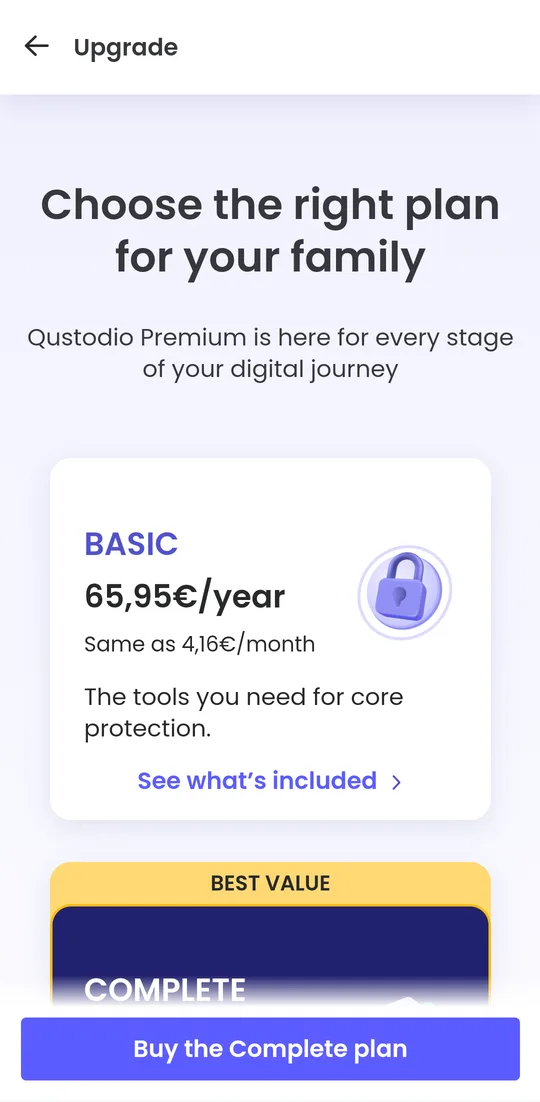
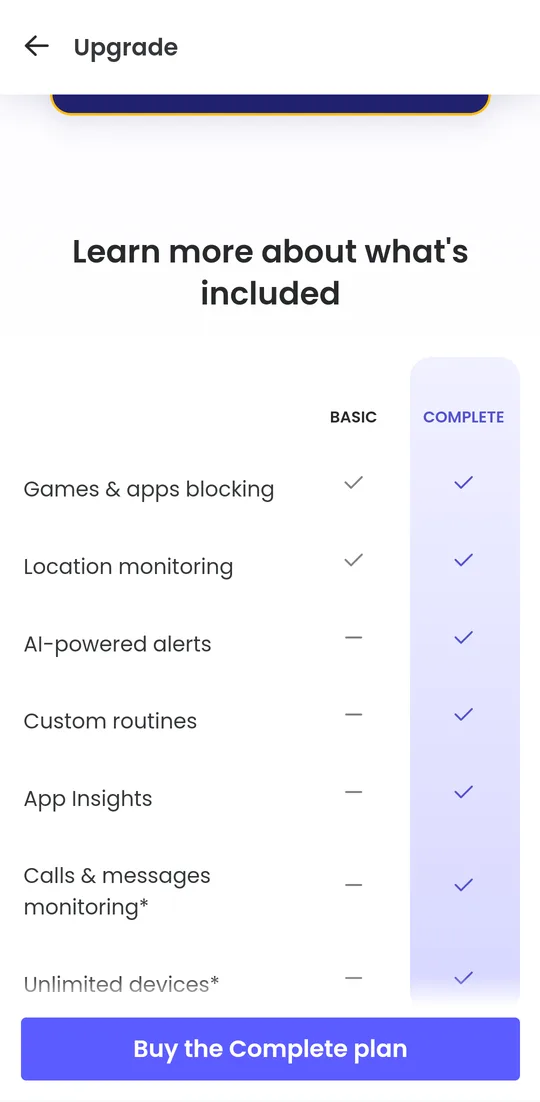
Our test account, November 2026.
Four things to know before you pay:
- Where you buy changes the price. The US App Store lists Basic at $59.99 and Complete at $99.99, plus other plan versions from $54.99 to $124.99. Google Play shows in-app items from $34.99 to $137.95.
- The free plan is thin. Qustodio's pricing FAQ says it "can protect a single device and includes basic protection features," and doesn't publish a full list. Location shows only as timeline entries, with no live map.
- Refunds depend on where you paid. Qustodio offers a 30-day money-back guarantee on purchases made on its website. If you bought in the App Store or Google Play, Qustodio says you need to ask Apple or Google.
- The trial is short. Our dashboard said "Your trial ends in 3 days" right after sign-up, and what you test in those days is the paid product. Turn on every rule on day one.
Qustodio Pros and Cons
| Pros | Cons |
|---|---|
| Ready rules for ages 10–13 in one tap | Child-phone setup needs five permissions and a certificate |
| Dashboard shows which rule is running right now | Reviews report kids deleting it or turning off its VPN |
| 30 web categories plus a per-site list | Fewer controls on iPhone; some need a computer |
| A different limit for each day of the week | Per-app limits and YouTube monitoring need Complete |
| Lock navigation or lock the device when time runs out | Billing and refund complaints top the parent reviews |
Is Qustodio Worth It vs. Free Family Link and iPhone Screen Time?
For most families of a 10–13-year-old with one phone, the free tools cover the basics. Google Family Link sets bedtime and daily limits, approves app downloads, blocks apps, filters mature content in Google Play and shows the phone's location. Apple's Screen Time (on iOS 27 under Settings > Family) has a Screen Time Schedule, Time Allowances, Allowed Contacts, Content & Privacy Restrictions and Ask to Buy. Neither costs anything.
| What you need | Free tool that does it | Qustodio adds |
|---|---|---|
| Daily limit and bedtime on one Android phone | Family Link | Little; Qustodio asks you to remove Family Link first |
| Same on one iPhone | Screen Time | Little; Qustodio has fewer controls on iPhone than on Android |
| Limit one app, leave homework apps unlimited | Family Link app time limits, Screen Time Time Allowances | The same, on the Complete plan only |
| Approve new apps | Family Link, Ask to Buy | App download alerts (Complete) |
| Rules on a Windows PC or Mac | Not Family Link; Screen Time covers Macs only | One dashboard for Windows, Mac, Android, iPhone, Fire and Chromebook |
| iPhone and Android in one family | Two separate apps | One set of rules and reports |
| See YouTube searches, get alerts on concerning searches | Family Link sets controls on YouTube and Search | YouTube monitoring and AI search alerts (Complete) |
We tested on two Android test phones (emulators) only. The Windows, Mac and Chromebook points above come from Qustodio's own documentation. This review doesn't compare other paid apps.
One Play reviewer summed up the one-phone case: "family link does much the same for free and you can leave the necessary apps on unlimited." Our guides walk through the free setups step by step: Android screen time limits, iPhone parental controls, and screen time limits by age for what to set.
Who Should Pay for Qustodio, and Who Shouldn't
Qustodio is worth it if
- your child uses a Windows laptop or a Mac as well as a phone, for school or homeschool;
- the family has both iPhone and Android, and you want one set of rules;
- you want YouTube monitoring or AI search alerts across several devices and will pay for Complete;
- you are ready to spend about 10 minutes per device and check the dashboard after setup.
Skip it if
- your child has one phone and you mostly want a daily limit and a bedtime;
- the family is iPhone-only: Screen Time is built in, and on iOS 27 Qustodio's anti-removal tool isn't supported;
- you hope software will end the screen fights. It won't on its own.
Settings Are Not the Whole Answer
A blocker decides when the screen goes dark. It doesn't decide what happens next. That part is a family habit. Pew Research found in 2025 that 86% of parents of children 12 and under have screen-time rules, but only 19% say they stick to them all the time.
The American Academy of Pediatrics advises parents to use parental controls and points to its free Family Media Plan. Write the plan with your child, then put two items where everyone can see them every day:
- "Screens off by 8 pm." The aim: your child turns it off before the lock does.
- "1 hour offline." Sport, a book, Lego, the dog. Something that fills the time a limit frees up.
When your child ticks these off daily, the controls can become a backup rather than the main battle. If the battle is already big, read our guide to screen addiction in kids. If screen fights come with falling grades, lost sleep, or a child who seems withdrawn or anxious, talk to your pediatrician or the school counselor. A blocker won't fix that on its own. If a phone is still a question, start with what age a child should get a phone.
Key Takeaways
- In one line: a strong parent dashboard, a demanding child-phone setup.
- The 10–13 preset sets 2 hours a day and a 9:30 PM bedtime, but leaves social networks and chat allowed.
- US price: $59.95 a year for Basic (5 devices), $104.95 for Complete (unlimited) on qustodio.com, checked November 3, 2026.
- Per-app limits and YouTube monitoring are Complete only in Qustodio; per-app limits are free in Family Link and Screen Time.
- For one Android phone or one iPhone, free Family Link or Screen Time covers the basics.
- Kids can undo controls. Set them up openly and pair them with a daily habit.
Frequently Asked Questions
Is Qustodio worth it?
It is worth it if your child uses a Windows PC or Mac, or your family mixes iPhone and Android, and you want one dashboard. For a single Android phone or iPhone, free Family Link or Screen Time covers daily limits, bedtime and app approval. In our test the parent side was easy and the child phone setup was demanding.
How much does Qustodio cost?
On qustodio.com in the US, Basic is $59.95 a year for up to 5 devices and Complete is $104.95 a year for unlimited family devices, as of November 3, 2026. In the US App Store, Basic is $59.99 and Complete is $99.99.
Is there a free version of Qustodio?
Yes. The Free plan protects one device with "basic protection features"; Qustodio doesn't publish a full list. Location appears only as timeline entries, with no live map. Sign-up starts a Premium trial with no card; our dashboard showed 3 days left right after sign-up.
Can kids get around Qustodio?
Some can. Parents in store reviews report kids deleting the app or switching off its VPN. Turn on Protect Android Settings, watch for Tampering detected alerts, and talk with your child about the rules. Common Sense Media notes that kids can undo parental controls.
Does Qustodio work on iPhone?
Yes, but with fewer features than on Android. On iPhone it blocks apps by cutting their internet connection, has no panic button, needs a computer for calls and messages, and its anti-removal tool does not work on iOS 27.
Is Qustodio better than Google Family Link?
For one Android phone, Family Link does the core jobs for free: daily limits, bedtime, app approval and location. Qustodio is stronger across several devices and computers, and its Complete plan adds per-app time limits, YouTube monitoring and alerts. Qustodio asks you to remove Family Link before installing.
Related Reading
Turn screen rules into a daily checklist
Family Checklist puts "Screens off by 8 pm" and "1 hour offline" on the family board next to everyone's tasks, and your child ticks them off each day. Free for 3 family members with 3 tasks each.

